The counter is ready the moment the page opens: tap and chant. This guide shows the basics in one minute, then the three shared features most people miss: group jap rooms, sync across phones and the leaderboard. All three are free and none needs a sign-up.
Counting in 4 steps
- Pick your name or mantra with the button at the top of the counter (Radha, Ram, Om Namah Shivaya, Gayatri… or type your own).
- Tap anywhere on the card once for each name. On a computer, press Space or Enter.
- After 108 a bell rings and the phone vibrates; the next mala starts by itself.
- Tapped by mistake? Press Undo. Open My jap to see today’s count, your streak and your sankalp.
My jap: your streak, sankalp and settings
My jap (the chart button under the counter, or the tab at the bottom of your phone) shows today’s jap, how many days in a row you have chanted, your best streak, a 7-day chart and a 5-week calendar. Here you can also:
- Start a sankalp such as 11,000, 1 lakh or 1 crore; the counter shows how many days are left at your pace.
- Fix today’s count if you chanted on a hand mala or tapped by mistake.
- Change beads per mala (108, 54, 27…), count down or timer mode, the Auto speed and the theme (in ⚙ Settings).
- Download a backup of all your counts.
- Follow a guided plan (for example “7 days: from Reels to Naam”) or keep a Daily niyam, your own daily list of jap.
Group jap rooms: chant together
A room is a shared sankalp. Everyone chants on their own phone, and every tap is added to one group total. It is perfect for a family sankalp, a satsang, or a 1 lakh jap for a festival.
- Open Group jap and fill in the room name, the name or mantra, the target (for example 1 lakh) and, if you like, your own name.
- Press Create room. You get a short link such as
/r/ABC234. Share it on WhatsApp. - Everyone opens the link and taps as usual. The room shows the group total, a progress bar, the number of members and a list of who chanted how much.
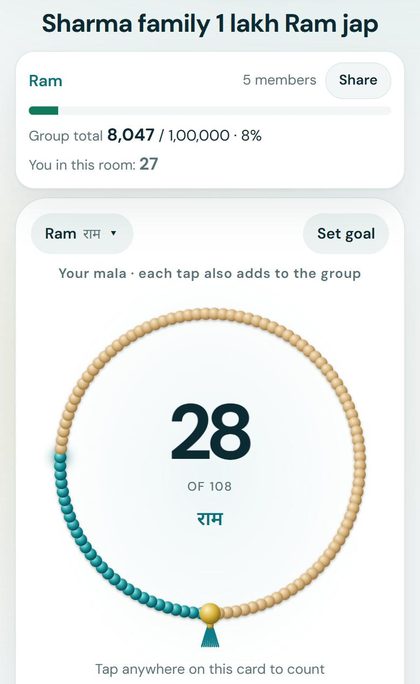
Good to know: names in the list are optional (people without a name show as “Devotee”). If the internet drops, taps are saved on the phone and added later. Taps always count on your own counter too.
If you made the room, you will see “Manage this room” below the counter. There you can rename it, change the target, or close it when the sankalp is done (you can reopen it later). “Copy manage link” lets you manage the room from your other phone; keep that link to yourself. A room with no jap for a whole year is archived: it can still be opened, and its maker can reopen it.
Sync across phones: one count everywhere
Chant on your phone in the morning and on a tablet at night? Sync keeps one total on both, without any account. Once sync is on, your counts are also stored on our server under your code, so that your devices can share them.
- On the first phone open My jap → Sync across devices → Turn on sync. You get a private sync code, like
ABCD-EFGH-JKMN. - On the other phone open My jap → Sync across devices → I have a code and type the code.
- Done. Jap from both add up (300 on one + 200 on the other = 500 on both), and your sankalp, your own names and badges are shared too. Up to 10 devices can use one code.
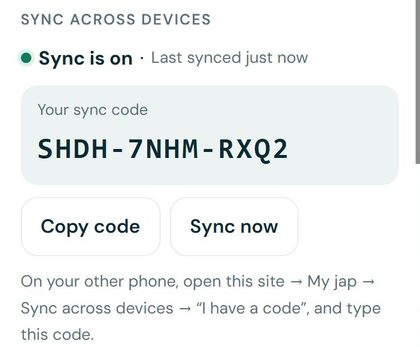
How can it work without an account? The sync code is your key. The server stores only a scrambled form of it, plus the counts; no name, phone number or email. Keep the code private, like a password: anyone who has it can see and add to your counts. If you lose it, each phone still keeps its own counts, and you can start a new code.
Leaderboard: optional and friendly
Some people find it motivating to see others chanting. The leaderboard shows the top chanters for today, this week, this month and all time.
- Open My jap → Leaderboard, type a display name (any name you like, such as “Radha Dasi”) and tick Show me on the leaderboard.
- From then on, the jap you count are added to the board, all names together. You also see your own rank.
- You can leave at any time from the same place.
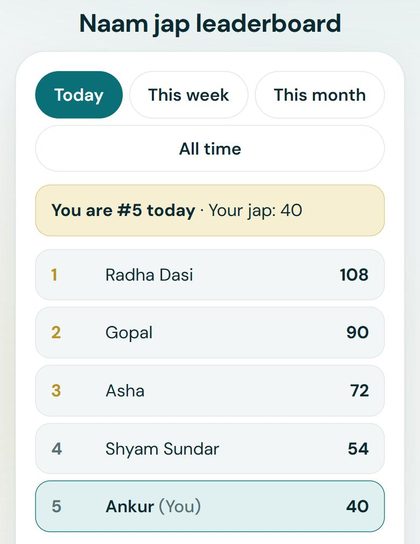
Only your display name and counts are shown; we never show which mantra you chant. There is a daily limit to keep the board fair. If you use sync on several phones, turn the leaderboard on in one phone only.
More helpful features
- Sound & voice: a soft tanpura drone, Om hum or temple bells in the background; record your own voice and let Auto mode play it and count; or let the phone read the mantra aloud.
- Auto counts by itself every 1–10 seconds; Focus fills the screen with just the mala.
- Badges, progress card and sankalp certificate to celebrate milestones and share them on WhatsApp.
- Daily reminder (installed app on Android) if you have not chanted by a time you choose.
- Works offline and installs to your home screen like an app.
There is no recorded singer on the site; the sound is your own voice, the phone’s reading voice, or the soft background drone.
The Naam Jap Streak Challenge
From 1 December there is a free Naam Jap Streak Challenge: chant 108 or more every day, any name or mantra. Complete every day of the month and you enter a free lucky draw: 108 winners share ₹21,535 every month. It is a draw, so completing the month gives you a chance, not a sure prize.
- Open My jap or the challenge page and join. Unlike the rest of the site, joining asks for your Indian mobile number, because winners must be reached.
- Chant at least 108 each day on this counter. The challenge card shows which days are done.
- Keep your claim code private; you need it if you win or change phones.
The official rules explain who can join, how the draw works and how prizes are sent. You never pay anything to take part. Read more in the how to start naam jap guide, or go straight to the naam jap counter.
Frequently asked questions
Do I need to sign up to use group jap, sync or the leaderboard?
No. None of them needs an account, email or phone number. Rooms use a share link, sync uses a private code, and the leaderboard uses a display name you choose. Only the prize challenge asks for a mobile number.
Does my jap in a group room also count on my own counter?
Yes. Every tap counts on your own counter and is also added to the room total.
What happens if I lose my sync code?
Your counts stay safe on each phone. The phones simply stop sharing. You can turn on sync again to get a new code.
Can people see what I chant on the leaderboard?
No. Only your display name and how many jap you counted are shown, never the mantra.
I cleared my browser data. Is everything gone?
Counts that were only on that phone are gone, unless you had a backup file or sync turned on. With sync, type your code again and your counts come back.
More naam jap counters
Last updated: